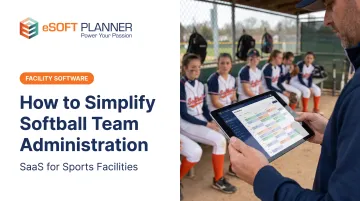
If this scenario feels painfully familiar, you're not alone. According to a 2025 national coaches survey, 84.6% of coaches across all sports report feeling burned out by their coaching duties, and 64.8% have seriously considered quitting. While the causes of burnout are varied, there's no question that administrative chaos—juggling registration, payments, schedules, and parent communication across disconnected tools—steals time from what you actually signed up for: coaching softball.
This guide will show you how to simplify every aspect of softball team administration so you can spend more time developing players and less time hunting down missing permission slips.
Key Takeaways
- One shared platform keeps every parent in the loop and cuts mixed messages
- Automated registration and payment tracking stops revenue leaks and frees admin hours
- Solid pre-season setup prevents most in-season scheduling conflicts and last-minute scrambles
- Team management tools consolidate schedules, rosters, and payments in one place
- Streamlined admin gives you time back for coaching and player development
Understanding the Softball Team Administration Challenge
Why Softball Administration Is Uniquely Complex
Softball programs face layered challenges that multiply administrative work. Many teams run extended seasons, with spring leagues bleeding into summer tournaments and fall ball, while sharing limited field access with baseball programs, youth leagues, and adult recreational teams.
Competitive travel teams add another layer: multi-state tournaments, overnight hotel coordination, roster submissions to tournament directors, and year-round training schedules that never fully go dark.
Most coaches and team managers end up with "scattered systems syndrome." Rosters live in spreadsheets. Quick updates go out over group text. Formal announcements sit in email threads. Payments move through Venmo or cash. Schedules sit on a shared Google Calendar, and tournament registration happens on yet another platform.
Information lives in silos. Parents claim they never got the message because it was buried in a 47-message text thread. You spend more time managing tools than managing your team.
The Real Cost of Inefficient Administration
The time drain is real. Hours vanish into manual tasks: updating rosters when players join mid-season, chasing late payments, resending schedule links, and answering the same questions from multiple parents because nothing is centralized.
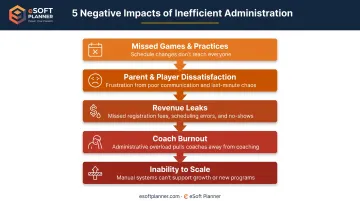
Beyond the hours, inefficiency creates tangible problems:
- Missed games and practices when schedule changes don't reach everyone
- Parent and player dissatisfaction tied to unclear expectations and poor communication
- Revenue leaks from late or forgotten payments that are never tracked down
- Coach burnout that drives experienced volunteers out of the game entirely
- Inability to scale when adding a second or third team becomes administratively unmanageable
A SafeSport survey found that 18.9% of coaches named help managing difficult athlete-family behavior as a critical support need. Unclear policies and scattered communication often fuel that friction.
Pre-Season Setup: Building Your Foundation
Most in-season headaches are preventable if you lock down the basics before opening day. The work you do in January decides whether April feels organized or chaotic.
Roster Management and Registration
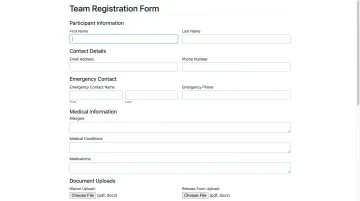
Collect complete player information once, in one place, during registration. Essential data includes:
- Full name and date of birth
- Parent/guardian contact information (email and mobile phone)
- Emergency contacts with phone numbers and relationship
- Medical information, allergies, and necessary medications
- Uniform size and any equipment needs
- Skill level or previous experience for placement decisions
Set firm registration deadlines and require all information fields to be completed before acceptance. Use automated confirmation emails to acknowledge receipt and spell out next steps. That alone stops the "I never heard back" problem before it starts.
If you run registration in a centralized system instead of paper forms or email, attach required documents straight to each player profile: liability waivers, medical releases, physical forms, and USA Softball player-release forms for competitive teams.
Digital records save time when a tournament director asks for proof of eligibility or a parent needs their signed waiver resent.
Payment and Fee Structure
Choose a payment model that matches your team structure and communicate it clearly at registration:
- Upfront seasonal fees: Best for recreational leagues with predictable costs; simplifies cash flow and reduces ongoing collection work
- Monthly installments: Helps families budget for higher-cost travel teams; requires automated tracking to stay on top of who's current
- Per-tournament fees: Common for select teams with variable schedules; adds administrative complexity but offers flexibility
Whatever model you choose, automate payment tracking. A simple system that shows at a glance who has paid, who owes what, and when the next installment is due will save you hours every month. Set up automatic reminders for upcoming or overdue payments so you're not manually chasing families via text.
Requiring at least a deposit or full fee at registration also protects revenue. Open unpaid spots and last-minute dropouts are much harder to fill once the season is underway.
Season Schedule and Field Coordination
Map out your full season before the first practice: games, practices, tournaments, training sessions, and any special events. Block recurring practice times early and confirm field availability with your facility or municipality to avoid conflicts with other teams.
Coordinate shared field access by:
- Reserving recurring weekly slots as soon as your league allows
- Building buffer time into your schedule for weather makeups
- Communicating blackout dates (facility maintenance, other events) to parents early
- Confirming tournament travel dates and registering well ahead of deadlines
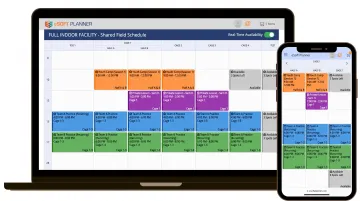
If your facility uses centralized scheduling software, use real-time calendars so every team sees the same field availability and double-bookings get blocked automatically. Tools like eSoft Planner are built for this kind of shared-field coordination across baseball and softball programs, including recurring practice blocks and maintenance windows.
In-Season Management: Keeping Everything Running Smoothly
In-season is the maintenance phase. Good systems run themselves; poor systems create constant fire drills.
Centralized Scheduling and Calendar Management
Maintain one master calendar accessible to all players and parents. It should display practices, games, tournaments, training sessions, and any team events. When a schedule change occurs (weather delays, field conflicts, opponent cancellations), update the master calendar immediately and push the change to everyone at once.
Real-time schedule updates matter. A change posted to a shared calendar but not communicated via text or email will still result in confused parents showing up to a canceled practice. Your system should allow you to update once and notify instantly.
Facilities running multiple softball teams benefit from a facility scheduling platform like eSoft Planner. It keeps practice and game schedules in one place, sends automated notifications when something changes, and shows field availability in real time so double bookings don’t slip through. Coaches and parents see the same live calendar, which cuts down on “I didn’t know” moments.
Attendance and Roster Tracking
Track player availability for games and practices before game day. A quick weekly availability check, automated through your team system or a simple poll, helps you avoid lineup surprises and adjust plans if you're short on pitchers or outfielders.
For teams that allow borrowing players from other squads in your organization, maintain clear records of who is rostered where and ensure any pick-up players meet league or tournament eligibility rules. USA Softball tournament forms include specific pick-up-player documentation that must be submitted, so keep those records accessible.
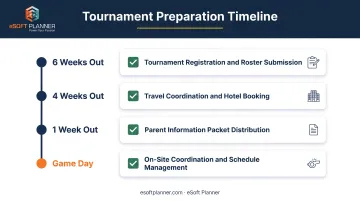
Managing Tournament and Travel Logistics
Tournaments add an administrative layer that in-season league play doesn't require:
- Tournament registration deadlines and roster submissions
- Travel coordination: hotels, carpools, departure times
- Parent information packets with game schedules, field locations, what to bring, and emergency contacts
- On-site adjustments when bracket play shifts game times or fields
Create a tournament information packet for parents at least one week before departure. Include:
- Full tournament schedule with field addresses and maps
- Hotel information and rooming lists (if applicable)
- Packing checklist (uniform, cleats, water, sunscreen, folding chairs)
- Emergency contact information for coaches and tournament organizers
- Any special instructions (parking, check-in procedures, meal plans)
Centralize this information in a shared document or team portal so parents can reference it without texting you at 6 AM on game day.
Communication Systems That Actually Work
Communication is the number one source of administrative headaches when done poorly and the number one time-saver when done well.
Eliminating the "Which Platform?" Confusion
When some parents rely on email, others check the team app, and a third group only reads group texts, important information gets missed.
Critical messages get buried in 50-message threads. Parents claim they never saw the schedule change because it lived on Facebook and they don't check Facebook.
Establish one primary communication channel for all team announcements and make it mandatory from day one. Acceptable options include a team management app with built-in messaging, a dedicated email list, or a team group text. Pick one and enforce it. Use backup communication (a phone tree or secondary text) only for emergencies like last-minute weather cancellations.
For minor-athlete communication, USA Softball's Safe Sport handbook requires that adult-to-minor electronic communication include a parent, guardian, adult family member, or another adult participant. Team messages to multiple minors must include another adult or parents, and all communication must remain professional. Group-based, auditable channels satisfy this requirement better than private one-on-one messaging.
Effective Parent Communication Practices
What to communicate:
- Schedule changes, weather cancellations, or field moves
- Game results and tournament brackets
- Practice focus areas or upcoming skill sessions
- Administrative reminders (payment due dates, tournament paperwork deadlines)
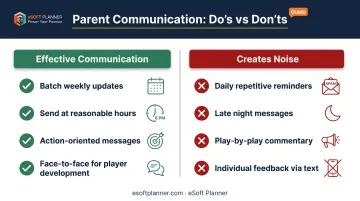
What creates noise and gets ignored:
- Play-by-play commentary during games
- Individual player feedback that should happen face-to-face
- Repetitive reminders sent daily instead of weekly
- Messages sent late at night when parents are asleep
Best practices:
- Send updates at reasonable hours (not 11 PM)
- Batch non-urgent information into a weekly update rather than five separate messages
- Set response expectations ("Please confirm receipt by Thursday")
- Keep messages concise and action-oriented
Research on youth sports parent-coach communication backs this up. A 2025 study of German youth soccer found digital messaging (WhatsApp groups, email) was used most often, yet both parents and coaches rated face-to-face interaction as more effective. Use digital tools for logistics and scheduling. Save personal conversations for player development and team culture.
Emergency and Last-Minute Communication
Time-sensitive situations such as severe weather, field emergencies, or sudden illness require instant, reliable notification to all team members and parents.
NFHS emergency-action-plan guidance recommends:
- A written plan distributed to relevant parties and accessible during all practices and games
- Clearly defined roles for coaches, trainers, and administrators
- Routine practice of the plan so everyone knows their responsibilities
- Activity-specific and location-specific protocols
For weather, NFHS lightning-safety guidelines call for:
- One designated decision-maker with authority to suspend activity
- Dependable communication to everyone present
- Immediate move to safety when thunder is heard or lightning is within six miles
- No resumption until 30 minutes after the last thunder or lightning
Store your emergency plan and contact list where every coach and assistant can retrieve it instantly, not buried in an email from two years ago. Use your primary communication channel to alert parents when practice or a game is suspended, and confirm that the message was received.
Post-Season and Year-Round Considerations
The off-season is your best window to improve systems and get ahead of next year.
End-of-Season Administrative Tasks
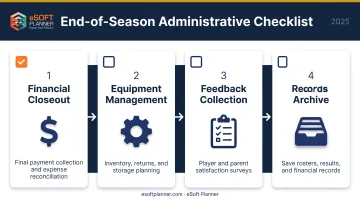
Wrap up your season with a systematic checklist:
- Final payment collection and reconciliation: Close outstanding balances and match expenses to collected fees
- Equipment inventory and returns: Account for uniforms, catcher's gear, helmets, and shared equipment; plan returns or storage
- End-of-season surveys: Collect feedback from players and parents on what worked, what didn't, and what they'd like to see next season
- Archive season records: Save final rosters, game results, tournament brackets, and financial records for future reference
Conduct a personal "administrative audit." What tasks consumed the most time? Which tools worked and which created confusion? What will you change next year? Document your answers while the season is fresh in your mind.
Off-Season Player Development and Winter Programming
Many softball programs now run year-round with winter training, indoor hitting clinics, strength and conditioning, or skills camps. Carry the same registration, scheduling, and payment tools into those programs so families already know the system and you skip re-entering player data.
Facilities that offer lessons, cage rentals, camps, and team practices can run it all in one place. eSoft Planner, for example, handles scheduling for lessons, camps, and practices across seasons, plus recurring membership billing and automated session reminders—so you are not juggling separate in-season and off-season tools.
Planning Ahead for Next Season
Capture momentum while families are still engaged:
- Open early registration for next season before players and parents move on to other activities
- Secure field time well in advance by working with your facility or municipality as soon as next year's schedules are available
- Recruit new players during the off-season through open clinics, skills assessments, or community events
If you run a facility rather than a single team, prioritize software that keeps multi-team schedules, rentals, camps, and memberships in one system with shared payments and messaging. Modular platforms like eSoft Planner start at $39 per month, so you only add the pieces you need.
Frequently Asked Questions
What does a softball team manager do?
A team manager handles admin work: registration, fees, scheduling, parent communication, rosters, and league or facility coordination. That backlog is what lets the coach stay focused on coaching.
What's the difference between managing a recreational softball team versus a competitive travel team?
Travel teams add more admin than rec ball: tournament deadlines, travel logistics (hotels, meals, carpools), higher fees with payment plans, and year-round programming. You’ll also handle tighter eligibility paperwork, such as USA Softball roster and pick-up-player forms.
How can I reduce the time I spend on team administration?
Start with three changes:
- Put all team communication on one platform instead of texts, email, and apps
- Automate payment tracking and reminders so you stop chasing families by hand
- Use scheduling tools that auto-notify parents when plans change
What information should I collect from players during registration?
Essential information includes full name, date of birth, parent/guardian contact details, emergency contacts, medical information and allergies, uniform size, and skill level or previous experience. For competitive teams, also collect any required liability waivers, medical releases, and eligibility forms at registration.
How do I handle parents who say they never received important team communications?
Pick one primary channel at season start, require read confirmations on critical updates (schedule changes, payment deadlines), and keep timestamped records. If a parent says they never got the message, you can show what went out and when, then point them back to that channel.
Should I use free tools or invest in paid team management software?
Free tools (group texts, spreadsheets, payment apps) are fine for tiny rec teams, but they fall apart as rosters and fees grow. Paid software usually earns back the cost through time saved, fewer missed payments, and one place for registration, scheduling, payments, and communication.