Auto-pay—automated recurring payment processing—solves this problem by automatically charging stored payment methods on schedule. No more manual invoicing, no more follow-up calls, and no more missed payments derailing your facility budget.
This guide explains what auto-pay is, why softball facilities need it, how the technology works, key features to evaluate, implementation best practices, and how to overcome common challenges.
Key Takeaways
- Auto-pay charges stored cards on schedule—no manual invoicing for memberships, programs, or installments
- Payment automation cuts collection work from 40 hours to 20–24 hours weekly and blocks payment-driven cancellations
- Automatic retries recover 60–70% of declined payments with no staff intervention
- Predictable recurring revenue supports accurate cash-flow forecasts and safer facility investments
- Start with new customers; offer existing members voluntary opt-in with incentives—not forced adoption
What is Auto-Pay and Why Softball Facilities Need It
Auto-pay is automated recurring payment collection. Customer payment methods (credit cards, debit cards, or ACH bank transfers) are securely stored and charged on a set schedule. For softball facilities, that covers monthly cage memberships, multi-month training programs, seasonal team registrations, and installment plans for camps or tournaments.
The softball facility business model is more complex than a simple gym membership. You manage:
- Monthly batting cage access memberships
- Seasonal team field rentals (spring, summer, fall leagues)
- Multi-week training programs and camps
- Drop-in bookings and hourly rentals
- Tournament hosting fees
- Private lessons and clinics
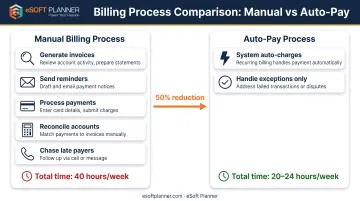
Each revenue stream has different payment schedules, amounts, and customer expectations. Traditional manual billing forces staff to track every transaction separately: generate invoices, send reminders, process payments, reconcile accounts, and chase late payers.
That work piles up while you are still trying to coach, schedule games, and maintain the facility.
The manual billing burden is real. Valley of the Sun YMCA reported that collection work consumed 40 hours weekly before automation. Staff emailed members twice monthly, made follow-up calls, and placed check-in alerts for cards approaching expiration.
Why Auto-Pay is Critical for Softball Facilities
Softball facilities face three specific challenges that make auto-pay essential:
Seasonal cash flow gaps: Indoor facilities spike in winter; outdoor complexes peak in spring and summer. Auto-pay spreads program costs across months, smoothing revenue so payroll and rent are less feast-or-famine.
High volume of small recurring transactions: A facility with 100 monthly cage members, 50 active training clients, and 20 teams creates 170+ monthly billing events. Manually processing each one is unsustainable.
Family payment preferences: Parents prefer spreading costs over months rather than paying $1,200 upfront for a seasonal program. Auto-pay supports installment plans (six monthly $200 payments) without creating six months of manual invoicing work.
Key Benefits of Auto-Pay for Softball Facility Operations
Cash Flow Predictability and Improvement
Auto-pay creates predictable monthly revenue by ensuring payments process on schedule rather than waiting for customers to remember, or have time, to pay. When 100 memberships renew automatically on the first of each month, you know exactly how much revenue will hit your account.
Valley of the Sun YMCA reported 100 fewer membership terminations caused by card declines in their first quarter after implementing automated payment services, with average monthly savings of $5,800 from prevented declines. That's nearly $70,000 annually recovered just by reducing payment-related leakage.
Fewer late payments mean more reliable cash for facility rent or mortgage, utilities, staff payroll, equipment maintenance, and inventory—without emergency gaps or short-term loans.
Time Savings and Administrative Efficiency
If manually processing 100+ recurring payments takes 10-15 hours monthly (invoicing, payment entry, reconciliation, and follow-up), auto-pay eliminates 90% of that workload.
Valley of the Sun YMCA cut collection work from 40 hours to 20-24 hours weekly, so they reassigned half of a payment administrator's role to accounting and filled a vacant position. That freed roughly 80 hours of staff time each month.
Time saved can be reallocated to revenue-generating activities:
- Coaching additional lessons or clinics
- Calling prospective members
- Developing new training programs
- Maintaining facilities and equipment
- Marketing and community outreach
Instead of back-office admin that generates zero revenue, your team focuses on growth.
Enhanced Customer Experience and Retention
Families prefer auto-pay because it eliminates the mental burden of remembering payment dates, logging into portals monthly, or writing checks. Payments happen automatically in the background, so members are not chasing due dates each month.
Auto-pay also reduces membership lapse. Customers on recurring billing are less likely to let memberships expire because there's no monthly decision point to reconsider. Without that monthly cancel-or-pay moment, more families simply stay enrolled.
The YMCA's 100 fewer payment-related terminations illustrate this: when cards are updated automatically and retries recover initially declined payments, customers stay enrolled who would otherwise have dropped off.
Reduced Late Payments and Failed Payment Recovery
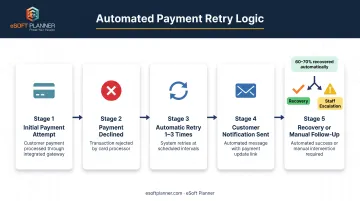
Auto-pay with automated retry logic (the system retries failed payments 1-3 times over several days) recovers 60-70% of initially declined transactions without staff intervention.
Contrast this with manual billing: when a payment fails, staff must notice the failure, contact the customer, obtain updated payment information, and reprocess the charge. Many of those payments are never collected.
Stripe's Smart Retries, for example, automatically retries failed payments up to eight times over two weeks, adjusting timing based on decline reason. PayPal retries every five days, up to twice per billing cycle.
Your staff only sees the exceptions: the 30-40% of failures that need manual follow-up. The system handles the rest.
Improved Financial Planning and Forecasting
Predictable auto-pay revenue enables facility operators to accurately forecast cash flow 3-6 months out, making it safer to invest in new batting cages, hire additional coaches, expand youth programs, or renovate locker rooms.
When 80% of your monthly revenue is locked in through recurring billing, you can plan major expenses without worrying that late payments will create a cash crunch.
Clean, automated payment data also integrates with accounting systems for real-time financial reporting without manual reconciliation, giving you accurate profit-and-loss statements and balance sheets at any moment.
How Auto-Pay Works in Facility Management Software
The Technical Flow
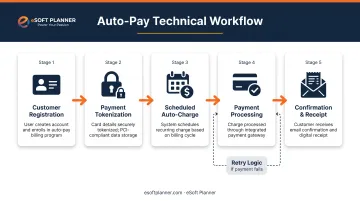
Step 1: Customer provides payment method during registration
When a family signs up for a membership or program, they enter their credit card or bank account information through a secure online form or at your front desk.
Step 2: Software securely tokenizes and stores payment credentials
The facility management platform sends payment information to a processor (Stripe, Square, PayPal, and similar) via API. The processor turns the card number into a secure token and keeps the real card details on its PCI-compliant servers. Your system stores only the token, not the raw card data.
Step 3: System automatically charges stored method on schedule
On the predetermined date (monthly membership renewal, installment plan due date, etc.), your software tells the payment processor to charge the stored token. The processor handles the transaction and reports success or failure back to your system.
Step 4: Customer receives confirmation
After a successful charge, the customer automatically receives an email receipt. If the payment fails, the system triggers retry and notification workflows.
Payment Processing Integration
Facility management software connects to payment gateways through APIs so charges, tokens, retries, and status updates stay in one place. Scheduling, membership records, and financial data stay in sync without re-keying payments by hand.
Scheduling Flexibility
Auto-pay supports various billing models:
- Fixed monthly memberships: Same amount on the same date each month (e.g., $99 cage membership on the 1st)
- Installment plans: Set number of payments over a fixed period (e.g., six monthly $200 payments for a $1,200 summer clinic)
- Usage-based billing: Charge based on actual bookings or credits used during the billing period
- Hybrid models: Combine a base monthly fee with variable usage charges
The Customer Experience
From the family’s side, auto-pay usually looks like this:
- Authorize recurring charges at registration
- Get email reminders 3–5 days before each charge
- Update a card or cancel in a self-service portal
- Receive an automatic receipt after each successful payment
Clear notices and self-serve updates cut “what did you charge me?” calls at the front desk.
Failed Payment Handling
When a card is declined due to expiration, insufficient funds, or fraud blocks, the system automatically:
- Retries 1–3 times over 3–7 days, spacing attempts so temporary issues can clear
- Sends automated notices to the customer with a secure link to update payment information
- Escalates to staff only after retries fail, with a dashboard of open accounts and quick tools to resolve them
Stripe flags hard-decline conditions (lost, stolen, or revoked cards) where retries will not work until a new payment method is on file, so the system skips useless repeat attempts.
Essential Auto-Pay Features for Softball Facilities
Flexible Payment Schedules
Your software should match how softball programs actually bill:
- Monthly memberships for ongoing cage and training access
- Multi-month installments (for example, a $1,200 seasonal fee split into six $200 payments)
- One-time future charges for clinics, camps, or equipment deposits
- Custom billing cycles tied to your league or lesson calendar
Automated Retry Logic and Dunning Management
Failed cards are inevitable. The system should handle them without a staff scramble:
- Retry failed payments on a defined schedule
- Send graduated notices (for example, "Your payment didn't go through—please update your card")
- Surface past-due accounts on a staff dashboard
- Offer one-click tools to update cards or resolve holds
Customer Portal Access
Members should handle routine billing themselves:
- View upcoming charges and payment history
- Update cards or ACH details
- Download receipts for reimbursement or records
- Pause memberships when your policy allows it
Integration with Scheduling and Access Control
Auto-pay status should drive facility access. A failed payment suspends cage booking until it clears; a successful payment restores access without staff editing permissions by hand.
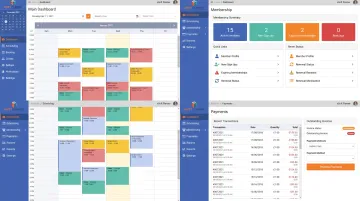
That link is where platforms built for sports facilities earn their keep. eSoft Planner, designed by operators who ran training facilities themselves, ties scheduling, memberships, and payment automation together. When a membership payment fails, it can suspend discounts and service credits so unpaid benefits stop immediately.
Payment status also syncs with access control: active, paid members book cages and check in normally, while failed payments are flagged at the door.
Implementation Best Practices for Softball Facilities
Start with New Customers; Offer Voluntary Opt-In for Existing Members
Require auto-pay for all new memberships and program registrations, establishing it as standard operating procedure. This sets clear expectations from day one.
For existing customers, offer incentives to switch voluntarily:
- Small discount (5-10% off monthly dues)
- Waived signup or processing fee
- Free month added to membership
- Priority booking privileges
This approach minimizes resistance while gradually transitioning your entire customer base.
Set Clear Payment Policies and Customer Communication
Update your terms of service to explain:
- How auto-pay works
- When charges occur (for example, "Membership dues are charged on the 1st of each month")
- Retry policies for failed payments
- Cancellation notice requirements (for example, "Cancel at least 7 days before your next billing date")
Send a welcome email series explaining how auto-pay works, when to expect charges, and how to update payment information. Notify customers 3-5 days before each charge is processed to eliminate surprises.
Train Staff on Payment Management Tools and Customer Service
Ensure front desk and administrative staff know how to:
- Help customers update payment methods
- Understand retry and failure workflows
- Handle billing disputes professionally
- Use the software's payment dashboard to monitor account health
Train your team to approach failed payments as helpful problem-solving ("Let's get this fixed so you don't lose access") rather than collections enforcement.
eSoft Planner’s unlimited consultative support can help your team learn the payment tools quickly and tailor auto-pay to your program mix, membership types, and seasonal versus year-round schedule.
Test Before Going Live
Run test transactions through the full payment flow (enrollment, successful charge, failed payment, retry, and customer portal update) before you process real customer payments. Verify that data syncs correctly between scheduling, membership records, and accounting.
Start with one program type (such as monthly cage memberships) before expanding to all payment scenarios, allowing you to refine processes incrementally.
Common Challenges and How to Overcome Them
Customer Resistance to Auto-Pay
Some customers distrust auto-pay due to concerns about losing control over spending or fear of overdraft if they forget about charges.
Solutions:
- Emphasize security and control: customers can cancel, update payment methods, and get advance notice before every charge
- Offer email or SMS reminders 3-5 days before the charge date
- Allow customers to choose their billing date (1st vs. 15th of the month) if your system supports it
- Clearly communicate your cancellation policy upfront so customers know they're not locked in
When people see the exit door and the charge date up front, more of them enroll without a hard sell.
Managing Failed Payments Without Damaging Relationships
You still need to collect when a card fails, but a heavy-handed tone can cost you the member.
Approach:
- Use automated friendly reminder emails ("Your payment didn't go through. Please update your card info here") rather than punitive language
- Give a 7-10 day grace period with automatic retries before suspending access
- Make updating payment information extremely easy (one-click link to secure portal)
- Train staff to approach conversations as helpful problem-solving, not collections enforcement
Most failed payments result from expired cards or temporary insufficient funds, not intentional non-payment. Treating customers with empathy preserves relationships and increases resolution rates.
Technical Integration and Setup Complexity
Integrating payment processing with facility management software can feel daunting for non-technical facility operators.
Solutions:
- Choose facility management software with native payment integration already built in, rather than trying to connect separate tools
- Work with your payment processor and software provider during onboarding; many offer setup support
- Test the full payment flow with small test transactions before going live
- Start with one program type (such as monthly memberships) before expanding to all payment scenarios
eSoft Planner combines scheduling, membership management, and payment automation in one system, so you are not wiring separate tools together. A dedicated onboarding team configures the account around your programs and billing rules, which keeps setup manageable for non-technical staff.
Frequently Asked Questions
What is auto-pay in softball facility management software?
Auto-pay is automated recurring payment processing where customer payment methods are securely stored as tokens and automatically charged on predetermined schedules. This eliminates manual invoicing and payment collection for memberships, training programs, and installment plans.
How does auto-pay improve cash flow for softball facilities?
Auto-pay charges customers on schedule, so you’re not waiting on forgotten or postponed payments. Retry logic recovers most failed charges, which means steadier monthly revenue and fewer gaps in cash flow for operating expenses.
What happens when an auto-pay payment fails?
The software retries failed payments 1–3 times over several days and emails customers a secure link to update their card or bank info. Staff only step in if retries fail. That process typically recovers 60–70% of declined transactions without manual work.
Can customers opt out of auto-pay at our softball facility?
While you can technically allow customers to opt out, best practice is to make auto-pay standard for new customers (stated clearly in signup terms) while grandfathering existing customers with optional enrollment. Universal auto-pay significantly reduces administrative burden and ensures consistent cash flow.
How do we transition existing customers to auto-pay?
Share the benefits and a clear timeline, then offer a small incentive for early signup. Let members enroll online, at the front desk, or by phone. Grandfather current billing cycles and require auto-pay at the next membership renewal.
What are the fees associated with auto-pay processing?
Card processing usually runs 2.5–3.5% plus $0.15–$0.30 per transaction; ACH is often $0.50–$1.00 flat or about 0.8% capped near $5. Many facilities pass this on as a convenience fee, and higher collection rates plus staff time savings usually offset the cost versus manual billing.
With invoicing off your plate and failed payments handled automatically, auto-pay gives softball facilities steadier cash flow—so your team can spend more time on coaching and keeping members engaged.