Key Takeaways
- Automate who enters, when, and through which doors—no more manual check-ins or lost keys
- Match cloud, network, or standalone systems to your facility size and operations
- Tie access to scheduling software so bookings and memberships unlock doors automatically
- Budget $1,500–$5,000+ per door based on system type, door count, and integrations
What Is Access Control for Sports Facilities
Access control is the technology that manages and monitors who can enter specific areas of your facility, replacing traditional keys with credentials: cards, fobs, mobile phones, or biometrics. Access control covers physical security (who can enter). Check-in systems track attendance (who did enter). Modern platforms often combine both.
Sports facilities need access control to manage complex schedules like team practices, private lessons, and open gym. The technology enables unstaffed hours, protects equipment, ensures youth safety, and reduces administrative burden.
Sports Facility-Specific Use Cases
Common sports-facility uses include:
- Locker room access by age group or membership tier
- Temporary tournament access for visiting teams and officials
- Equipment storage limited to staff and coaches
- Parent pick-up zones with time-based permissions
That same demand shows up in the broader market: physical access control reached $15.1 billion in 2024 and is forecast to hit $21.3 billion by 2030, as more facilities replace keys with credential-based entry.
What Are the Three Main Types of Access Control Systems
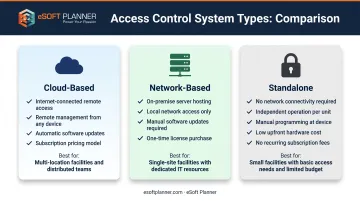
Access control systems fall into three categories based on how they connect and operate: cloud-based, network-based, and standalone. The right choice depends on facility size, number of doors, IT infrastructure, budget, and operational requirements.
Cloud-Based Systems
Cloud-based systems are internet-connected solutions managed through online portals you can open from any device. For sports facilities, benefits include:
- Remote management (grant access from home when a coach calls)
- Automatic software updates
- Mobile credentials and real-time notifications
- Easy multi-location management
Cloud systems typically require monthly or annual licensing fees but offer the most flexibility. HOTWORX manages 800+ unstaffed studios and 250,000 members on Brivo's cloud platform, a clear example of how this model scales.
Ideal use cases:
- Multi-location facilities
- 24/7 operations
- Facilities with frequent access changes
- Businesses that want mobile app access
Network-Based Systems
Network systems are on-premise solutions that connect over a local network without cloud integration. Benefits include:
- No recurring licensing costs
- Data stays on-site
- Reliable operation without internet dependency
Modern network systems now deliver stronger feature sets and simpler day-to-day use than older on-premise gear.
Ideal use cases:
- Facilities with strong IT infrastructure
- Businesses preferring a one-time investment over recurring fees
- Organizations with data sovereignty requirements
Standalone Systems
Standalone systems are individual door locks programmed independently, with no network connectivity.
Benefits:
- Simple installation with no IT infrastructure required
- Work in locations far from power or network
- Cost-effective for limited door counts
Limitations:
- No centralized management portal
- Manual programming required for each lock
- Limited audit trail capabilities
Ideal use cases:
- Small facilities (1–5 doors)
- Outdoor gates or storage buildings far from the main building
- Facilities with basic access needs or tight budgets
How Access Control Systems Work: Hardware + Software
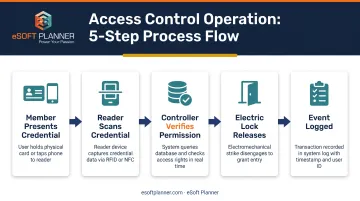
When a member presents a credential at the door, the system checks permission, unlocks or denies entry, and logs the result.
That path runs in a fixed order:
- Member presents a credential (card, fob, or phone)
- Reader scans the credential at the door
- Controller verifies permission against the database
- Electric lock releases if authorized
- Event is logged for audit and reporting
Four main hardware components:
- Credential reader: Mounted at door to scan cards, fobs, or phones
- Controller: Decision-making device that validates credentials
- Electric lock: Physical barrier that secures or releases the door
- Power supply/backup: Ensures operation during outages
The software layer is where administrators create users, set schedules, define permissions, view access logs, and generate reports.
Modern systems keep working during internet outages by caching permissions locally in the controller. Verkada systems retain 3-12 months of events depending on volume.
Access Methods: How Members Enter Your Facility
How members get in depends on the credential you issue. These five primary types trade off convenience, security, and cost differently:
| Credential Type | Convenience | Security | Sharing Risk | Replacement Cost |
|---|---|---|---|---|
| Mobile app | High (always have phone) | High | Low (device-locked) | $0 |
| RFID cards | Medium | Medium | High (easily shared) | $5-$10 |
| Key fobs | Medium | Medium | High (easily shared) | $5-$10 |
| PIN codes | Medium (must remember) | Low (can be shared) | Very high | $0 |
| Biometrics | High (can't forget) | Very high | None | N/A |
Mobile credentials are increasingly preferred for sports facilities:
- Members already carry their phones
- Credentials stay device-locked and are harder to share
- Issuance and revocation are instant
- No physical card or fob costs
A 2024 Security Industry Association survey found that 39% of organizations already use mobile credentials, and 80–94% expect to deploy them within five years.
Offer more than one credential type when you can so you cover real-world use cases: mobile for members, cards for staff, and PINs for temporary contractors.
Key Features Sports Facilities Should Prioritize
Scheduling Integration & Automated Access
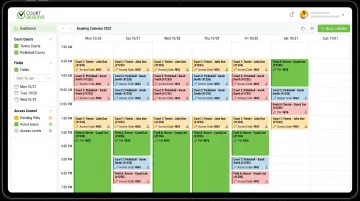
Access control integrates with scheduling software to automatically grant access based on reservations, memberships, and class registrations. The workflow eliminates manual access management: member books a court time online → access is automatically granted for that specific time slot → member's credential only works during their reserved window.
This integration prevents unauthorized facility use, limits access to paid time windows, and cuts administrative workload.
Facilities using platforms like eSoft Planner can connect booking data directly to door permissions. Clients receive unique access codes for scheduled appointments and can enter only during the booked period—no staff required on site.
Time-Based Access & Scheduling Rules
Time-based access controls restrict when credentials work. Team A might enter only Monday and Wednesday from 6–8 PM, coaching staff get 24/7 access, and maintenance is limited to weekdays 6–10 AM. That setup stops membership abuse (off-peak members showing up during peak hours) and enforces facility rules automatically.
Sports-specific scheduling scenarios include:
- Temporary credentials for tournament weekends
- Seasonal sport schedule changes
- Automatic holiday closure enforcement
- Weather-related facility lockdowns
Zone-Based Access & Area Restrictions
Zone control limits which doors or areas each credential can open:
- Members: training areas, not equipment storage
- Coaches: locker rooms and courts
- Staff: offices and back-of-house spaces
For youth safety, zones also support restricting unaccompanied minors, setting parent pick-up areas, and controlling locker room access by age group.
Audit Trails & Reporting
Access control systems log every entry attempt with timestamp, credential used, door accessed, and grant or deny result. Those records support incident investigation, membership verification, usage analysis, and liability protection.
When equipment goes missing or an incident occurs, the logs show who was in the facility and when.
Mobile App Management & Remote Control
Administrator mobile apps typically support:
- Granting emergency access remotely
- Receiving real-time alerts
- Temporarily unlocking doors for deliveries
- Checking who is currently in the facility
Member-facing apps often include:
- Unlocking doors from a phone
- Access notifications
- Facility schedule views
- Reservation status checks
Hardware Options for Sports Facilities
Door Lock Types
The main lock types serve different security and compliance needs:
- Electromagnetic locks (maglocks) - Fail-safe by design, unlock during power loss
- Electric strikes - Release the frame strike; may be fail-safe or fail-secure
- Electrified mechanical locks - Locking function in the lock body
- Battery smart locks - No wiring required; decide unlocks on the lock when the network is down
Lock choice depends on door type (glass storefront, metal exterior, wood interior), traffic level, and security requirements. Critical: Exit doors must be "fail-safe" (unlock during power loss) for fire code compliance, while fire-rated doors may require fail-secure strikes for positive latching.
Readers & Credential Scanners
Common reader options include:
- Wall-mounted card readers for main entries and corridors
- Mullion-mounted slim readers for narrow frames and glass doors
- Smartphone readers (Bluetooth/NFC) for mobile credentials
- Keypad readers for PIN entry or PIN-plus-card
- Biometric readers where higher assurance is required
Multi-technology models such as HID Signo readers accept cards and mobile credentials on one device, so you can change credential types without replacing every reader.
Match the reader to credential type, indoor vs. outdoor exposure, mounting space, and how the entry should look to members and staff.
Special Considerations for Sports Facilities
Sports sites add hardware demands most offices never see:
- Outdoor gates and perimeter doors need weatherproof locks and readers
- Locker room and lobby doors take heavy daily traffic and need durable readers
- Training bays and field houses often need overhead or large-opening door integration
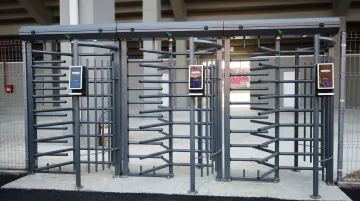
At busy front desks and member entries, turnstiles or speed gates stop tailgating (a second person slipping in on one valid credential). Boon Edam outlines four security levels from basic crowd control through active detection and prevention—use that scale when a standard door reader is not enough.
Cloud vs. On-Premise: Software Platform Considerations
| Factor | Cloud-Based | On-Premise |
|---|---|---|
| Hosting | Vendor-hosted | Your servers |
| Access | Anywhere with internet | Local network |
| Updates | Automatic | Manual IT work |
| Pricing | Subscription | One-time purchase + upkeep |
| IT burden | Minimal | Ongoing management required |
Cloud platforms are the industry standard for most sports facilities. Remote management, lower upfront costs, and easier scaling suit single sites and multi-location operators alike. HID Origo states at least 99.5% service availability, reliability comparable to on-premise systems.
On-premise still fits some operators:
- Facilities with mature IT teams and existing server infrastructure
- Organizations that need full local data control
- Operators who want to avoid recurring software fees
For chains and franchises, a cloud dashboard manages access across every location from one place—without sending IT staff site to site.
Integration with Sports Facility Management Software
Access control delivers the most value when it connects to facility management software and updates permissions without staff intervention. Integration can:
- Suspend access automatically when a member's payment fails
- Disable credentials as soon as membership expires
- Grant time-based access when someone books a court or field
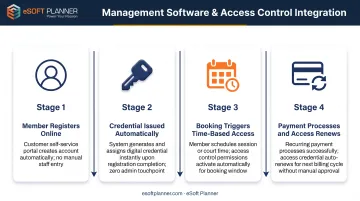
Integration Workflows
A typical connected workflow looks like this:
- Member registers online and a profile is created in the management system
- An access credential is issued automatically
- A booking triggers time-based access for that slot
- Payment processes and access renews for the next period
Scheduling platforms like eSoft Planner remove the manual work of deciding who can enter, where, and when. Its access management tools connect with smart locks to send codes to clients with scheduled appointments, which supports unmanned or 24/7 operations.
Integration Methods
Common integration methods include:
- Direct API connections for real-time data exchange between systems
- Webhooks that push event-triggered permission updates
- Middleware platforms such as Zapier to link different tools
- Native integrations built into specific platform pairs
Brivo's Mindbody integration shows what native integration delivers: member records sync automatically, members receive mobile credentials, and access ends when membership expires.
Cost Factors: What Sports Facilities Should Budget
Access control costs vary widely based on system type, number of doors, hardware complexity, and integration requirements. According to Kisi's 2026 manufacturer estimates, typical cost components include:
Hardware costs:
- Reader plus locking hardware: $600-$1,500 per door
- Installation (existing locks): $500-$1,500 per door
- Installation (no existing locks): $1,200-$2,500 per door
Software costs:
- Cloud systems: $0-$50 per door/month
- Network systems: One-time licensing (varies widely)
Total per-door range: $1,500 for a simple standalone setup to $5,000+ for an integrated cloud system with advanced features. Most projects land between $2,000 and $4,000 per door for initial installation.
ROI Factors
Budget for more than hardware—access control often pays back through day-to-day operations:
- Cut staffing costs with unstaffed hours and true 24/7 access
- Protect revenue by blocking membership sharing and unauthorized entry
- Drop rekeying spend tied to physical key management
- Strengthen retention with a smoother member check-in experience
Uncaged Fitness reported lower staffing needs and a faster second-location launch after modernizing access—gains that sit outside the install line items above.
Implementation Roadmap: Getting Started with Access Control
Follow this step-by-step checklist:
- Audit facility - Identify all doors needing control
- Define user groups - Determine access requirements by role
- Choose system type - Select based on needs and budget
- Select hardware - Match to each door type and environment
- Choose software platform - Verify integrations with existing systems
- Hire qualified installer - Get a professional site survey
- Phase the rollout - Start with main entries and equipment storage, then expand
- Train staff and members - Communicate changes before launch so adoption stays smooth
A professional site survey matters. Installers assess door types, power availability, network connectivity, and facility layout so hardware matches each opening. Assign clear implementation owners and test every permission rule before go-live.
Frequently Asked Questions
What are the three main types of access control systems?
The three main types are:
- Cloud-based — internet-connected and managed remotely via a web portal
- Network-based — local network with on-premise software
- Standalone — individual locks with no network
Each fits different facility sizes, budgets, and operational needs.
What are the 5 steps of access control?
Access control typically follows five steps:
- Identification — who are you?
- Authentication — prove it with a credential
- Authorization — are you allowed?
- Access — the door unlocks
- Audit — the event is logged
That workflow keeps unauthorized people out and leaves a full record of who entered.
How much does a door access control system cost?
Costs range from $1,500-$5,000+ per door depending on system type, hardware complexity, and installation requirements. Cloud-based systems add $0-$50 per door monthly for software and maintenance. Budget for professional installation and integration if connecting to scheduling software.
Can access control integrate with my existing scheduling software?
Yes. Many systems connect through APIs, webhooks, or native integrations so access is granted or revoked automatically from bookings, memberships, and payments—no manual credential updates.
What happens if the internet goes down?
Door controllers usually cache permissions locally, so doors keep working on the last synced rules during an outage. Events store on the controller and sync when the connection returns.
Do I need access control for an outdoor sports facility?
Yes, if you need to manage field or court use, secure equipment storage, control gates, or run unstaffed hours. Use weatherproof hardware and confirm IP ratings and temperature ranges match your climate.