Introduction
Softball facilities face a persistent revenue challenge: high-value tunnels sit empty during mid-morning weekdays while prime after-school slots get double-booked. No-shows drain thousands of dollars annually.
A paper calendar or shared spreadsheet can't prevent two staff members from booking the same tunnel at 6 p.m. It can't collect payment before a team cancels 10 minutes before their slot, or show you which tunnels are bleeding money during slow periods.
Effective tunnel booking requires:
- Conflict prevention when a full tunnel competes with individual lane requests
- Payment collection that protects revenue from last-minute cancellations
- Clear policies customers can't ignore
- Visibility into which slots are profitable versus dead weight
This guide walks through how to set up scheduling that fills your tunnels, protects your revenue, and eliminates the chaos of manual booking.
Key Takeaways
- Clear scheduling rules, online booking, and deposits prevent conflicts and maximize tunnel usage
- Nested asset logic blocks individual lanes when the full tunnel is booked, eliminating double bookings
- Peak-hour premiums and off-peak discounts balance demand without sacrificing overall revenue
- One system can run practices, lessons, walk-ins, and instructor schedules without spreadsheet juggling
How to Set Up Softball Tunnel Booking and Scheduling
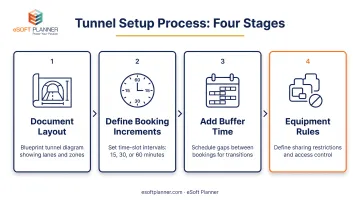
Step 1: Map Your Physical Tunnel Layout and Define Booking Rules
Start by documenting exactly what you have: how many tunnels, which can be divided into individual lanes, which are dedicated lesson spaces, and which are open for walk-in rental. Create a simple diagram showing tunnel count, lane divisions, and any retractable net configurations that let you combine or separate spaces.
Next, define your booking increments. Direct operator examples show varied approaches:
- Batting a Thousand (Portland) offers 30- or 60-minute sessions, with a new 15-minute option added in May 2025 for quick warm-ups
- Powerhouse Batting Cages (Las Vegas) uses 30- and 60-minute standard blocks for their 70-foot tunnels
- D-BAT Cedar Park schedules all cage rentals in half-hour increments
Decide whether you'll use 15-, 30-, or 60-minute blocks based on your customer mix. Shorter blocks work for casual hitters; longer sessions suit team practices and serious training.
Add buffer time between sessions. Roosevelt Student Wellness publishes a 10-minute buffer with one-hour cage reservations—the only direct example found in current facility policies. Use this window for net adjustments, equipment resets, and cleanup. Without it, back-to-back bookings create chaos when customers arrive early or run late.
Finally, document policies for shared equipment. If Lane 1 and Lane 2 both need the same pitching machine, how do you prevent conflicts? Establish rules now, before a customer shows up expecting gear that's already in use.
Step 2: Establish Pricing Structure and Payment Policies
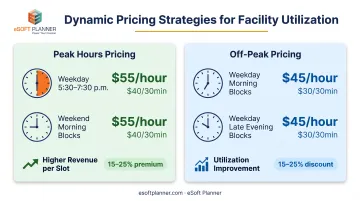
Set base rates for different tunnel types, then layer in time-based pricing that reflects actual demand. Two facilities illustrate how peak/off-peak pricing works in practice:
Town of Tonawanda (NY):
- Peak (weekday 5:30-7:30 p.m., Saturday 9:30 a.m.-noon): $55/hour or $35/half-hour
- Off-peak (all other times): $45/hour or $30/half-hour
Sandlot San Diego:
- Peak (weekday 3-8 p.m.): $40/30 min, $75/60 min
- Off-peak: $30/30 min, $50/60 min
Notice the pricing structures differ. There's no universal percentage premium. Build your own rates based on local demand patterns, competitor pricing, and your cost structure.
Determine deposit requirements and cancellation windows. Policies from current operators vary widely:
| Facility | Cancellation Window | Consequence |
|---|---|---|
| Batting a Thousand | 12 hours | Full refund if canceled 12+ hours before |
| D-BAT Cedar Park | 24 hours | Less than 24 hours incurs full cage price |
| Fox Valley Park District | 48 hours | Full refund minus $5 fee with 48+ hours' notice |
| NE Complex | Graduated | 3+ days: 100% refund; under 24 hours: 0%; no-show: 100% forfeiture |
Choose a window that gives you enough lead time to re-book the slot while remaining fair to customers. Facilities that collect payment at booking reduce no-shows, though no cage-specific study quantifies the exact reduction.
Pair that window with a clear deposit rule. Most facilities require full prepayment for walk-in rentals or a 50% deposit for team bookings, adjusted for local no-show history. Fox Valley Park District, for example, collects a fixed $100 deposit at confirmation on its batting-cage agreement.
Step 3: Choose and Configure Scheduling Software
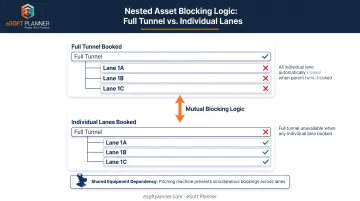
Select software that handles nested assets—meaning when someone books the full tunnel, all individual lanes are automatically blocked, and vice versa. The system should also track instructor availability alongside facility rentals, support online booking, and prevent the conflicts that plague manual calendars.
eSoft Planner's rental scheduling module was built by facility operators who ran sports academies themselves. It manages batting cages, pitching tunnels, team practices, private lessons, and walk-in rentals in one platform. MVP, a facility with nine batting cages, used eSoft Planner to let customers reserve individual cages or groups (such as cages 1-3) while dedicating specific cages to lessons after adding instructors.
During configuration:
- Define each tunnel and lane as a bookable asset
- Set your pricing rules, including peak/off-peak rates and any add-ons (Rapsodo, HitTrax, equipment rental)
- Enter booking increments (15-, 30-, or 60-minute blocks)
- Establish staff permission levels so front-desk staff can override when necessary while tracking every manual change
- Configure automated reminders and confirmation messages
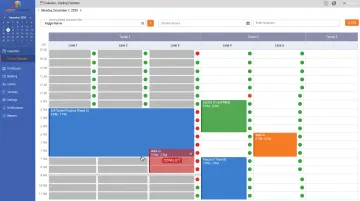
The platform publishes real-time availability online, preventing double-bookings when customers book simultaneously from different devices or when staff processes a phone reservation while someone completes an online checkout.
Step 4: Train Staff and Launch Customer-Facing Booking
Train front-desk staff on:
- Handle overrides for special requests or VIP customers
- Process refunds within your cancellation policy
- Assist customers who struggle with online booking
- Resolve tunnel conflicts that appear despite software safeguards
Publish booking links prominently on your website and social channels. Send announcement emails to existing customers explaining the new system, including screenshots or a short video walkthrough. Emphasize the convenience of 24/7 booking and instant confirmation.
Monitor the first two weeks closely. Watch for:
- Rule conflicts you didn't anticipate (e.g., buffer time too short, pricing displaying incorrectly)
- Customer confusion about how to book lanes versus full tunnels
- Staff questions about refunds, overrides, or technical issues
Adjust rules immediately when problems surface. Most facilities complete this launch process in 2-4 weeks. Plan one week for layout documentation and data import, one week for software configuration and testing, and one week for staff training and soft launch.
When Should You Use Scheduling Software for Softball Tunnels?
Not every facility needs software immediately. A single-tunnel facility with low volume and one staff member might manage with a spreadsheet initially, though even small operations outgrow manual systems quickly.
Software becomes essential when you experience:
- Recurring double-bookings when staff miss a calendar check or two reservations overlap
- Empty weekday mornings and late evenings because customers can’t book outside business hours
- Multiple instructors with different availability, preferred tunnels, and rates
- Competing demand from team practices, individual rentals, private lessons, and walk-ins
- Membership packages that need credit tracking, expiration dates, and usage limits
Facilities managing 3+ tunnels, offering lessons, or processing more than 50 bookings per week typically see immediate ROI from automation. At that volume, tracking instructor availability across tunnels and preventing conflicts makes manual scheduling impractical.
What You Need Before Implementing Tunnel Booking Software
Preparation directly impacts how quickly you see results and how smoothly the launch goes. Gather this information before configuration begins.
Equipment and Layout Documentation
Create a diagram showing:
- Total tunnel count and physical dimensions
- Lane divisions within each tunnel (if applicable)
- Retractable net configurations that allow combining tunnels
- Dedicated lesson spaces versus open rental areas
- Shared equipment locations (pitching machines, screens, training aids)
This map becomes the foundation for your software configuration. Without it, you'll make guesses during setup that require painful corrections later.
Existing Customer and Pricing Data
Compile the following before setup:
- Customer contacts (names, emails, phone numbers)
- Membership types, if you offer them
- Instructor roster with specialties and typical rates
- Historical pricing by tunnel type and time slot
- Notes on which time slots have the highest demand
Importing this data during setup means you launch with existing customers already in the system, ready to book online immediately.
Staff Readiness and Policy Decisions
Finalize these policies before configuring software:
- Cancellation windows — 12, 24, or 48 hours? Different rules for individuals vs. teams?
- No-show penalties — Forfeit deposit, charge full amount, or suspend booking privileges?
- Payment requirements — Full prepayment, 50% deposit, or pay-at-door for trusted customers?
- Staff permissions — Who can override the system, process refunds, or adjust pricing?
Changing these policies after launch confuses customers and creates inconsistent booking handling.
Key Factors That Affect Tunnel Scheduling Success
Successful tunnel scheduling depends on several controllable variables. Get these right and utilization climbs; ignore them and your tunnels stay half-empty even during periods when you should be turning customers away.
Conflict Prevention Through Nested Asset Logic
Full-tunnel bookings must automatically block individual lanes, and vice versa. When a team reserves Tunnel 1 from 6-7 p.m., the system should prevent anyone from booking Lane 1A or Lane 1B during that hour. When three customers book individual lanes, the system should block full-tunnel availability.
Nested asset logic prevents the top complaint at sports facilities—showing up to find someone else using your reserved space.
Buffer time between sessions (10-15 minutes) handles equipment changes, net adjustments, and cleanup. Without it, customers from the previous session are still packing up when the next group arrives.
Equipment dependencies matter too. If Tunnel 1 and Tunnel 2 share a pitching machine, the system should track that dependency and prevent simultaneous bookings that require the same equipment.
Dynamic Pricing to Balance Demand
Premium rates during peak hours (weekday 5:30-7:30 p.m., weekend mornings) paired with discounts during slow periods (weekday 10 a.m.-2 p.m., late evenings) improves utilization. This approach maintains overall revenue while filling more time slots.
Start with simple daypart pricing:
- Peak hours: Add 15-25% to base rates for high-demand windows
- Standard hours: Use your base rate
- Off-peak hours: Discount 15-25% to encourage bookings during slow periods
Tonawanda charges $55/hour peak versus $45/hour off-peak—an 18% discount. Sandlot San Diego uses $40/30 min peak versus $30/30 min off-peak—a 25% discount.
Find the balance that fills slow periods without training customers to wait for discounts during times they'd pay full price.
Layer in seasonal or promotional pricing later once you understand your demand patterns.
No-Show Reduction Through Deposits and Reminders
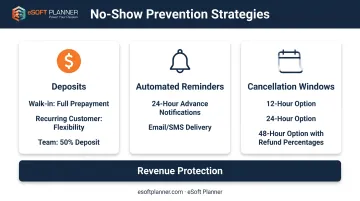
No-shows leave holes in your schedule that are too late to fill, costing you revenue you can't recover. Three strategies protect revenue: requiring deposits (or full prepayment), sending automated reminders 24 hours before each session, and enforcing clear cancellation windows.
Deposit strategies:
- Walk-in individual rentals: Require full prepayment
- Recurring customers: Consider allowing payment at arrival once they've established reliability
- Team bookings: Require 50% deposit or full payment, adjusted based on your no-show history
Automated reminders keep sessions top-of-mind and reduce no-shows by ensuring customers don't simply forget their bookings.
Monitor your weekly no-show rate to refine policies over time. If you're losing money to no-shows, tighten your cancellation window or increase deposit requirements. If no-shows are rare, you might relax policies for trusted customers.
Membership and Package Structures
Recurring memberships (e.g., $125/month with 30 minutes daily cage time) and prepaid packages (e.g., 10-session bundles at 15% discount) drive predictable cash flow and repeat visits.
Example membership models from current operators:
- The Cages (AZ): $125/month includes 30 minutes daily cage time; additional rentals are $25/30 min and $40/60 min (versus $35/$50 for non-members)
- In The Net (Silver plan): $30/month with discounted rental rates
- In The Net (Gold plan): $545/year with one free 30-minute rental daily
Set peak/off-peak entitlements to protect prime-time inventory. Don't let unlimited memberships consume every 6 p.m. slot—restrict included time to off-peak hours or limit how many prime slots members can book per week.
Offer rollover limits (e.g., unused sessions carry forward one month only) to prevent members from hoarding credits and booking months in advance, blocking availability for higher-margin pay-per-use customers.
Real-Time Visibility and Utilization Tracking
Staff need instant visibility into the full schedule across all tunnels and instructors to avoid conflicts and fill gaps. When a customer calls asking for availability Tuesday at 5 p.m., staff should see tunnel availability and instructor schedules at a glance.
Track usage by daypart and tunnel to identify underused assets:
- Which tunnels consistently sit empty during which time slots?
- Are off-peak discounts successfully filling slow periods or do rates need further adjustment?
- Do certain instructors have scheduling conflicts that suggest you need more staff or different availability windows?
Use this data to optimize marketing (promote slow periods with targeted offers), adjust pricing (increase discounts for persistently empty slots), or reallocate resources (convert an underused tunnel to dedicated lesson space during slow hours).
Common Mistakes When Managing Softball Tunnel Bookings
Avoid these three critical mistakes that cost facilities revenue and create scheduling chaos:
Skipping deposits or clear cancellation policies leads to frequent no-shows and last-minute holes in your schedule. When customers can cancel without consequence, they treat bookings casually.
Some facilities retain 100% of fees after no-shows—a strict policy that protects revenue but requires clear communication upfront so customers can't claim surprise.
Charging flat rates regardless of demand leaves money on the table during peak hours while underutilized off-peak slots stay empty. If you charge $50/hour whether it's Tuesday at 10 a.m. or Thursday at 6 p.m., you're covering empty morning slots with foregone evening revenue.
Time-based pricing captures more revenue from high-demand periods while making slow periods attractive to price-sensitive customers.
Allowing manual overrides without tracking them creates conflicts, confuses customers, and undermines trust in your booking system. Staff who can override the schedule without documentation will eventually double-book a tunnel or promise availability that doesn't exist.
Every override should be logged with who made it, when, and why—both for accountability and to identify patterns that suggest your rules need adjustment.
Frequently Asked Questions
How do I prevent double-bookings when tunnels can be divided into lanes?
Use scheduling software with nested asset logic that blocks the full tunnel when lanes are booked, and vice versa. Add 10–15 minutes of buffer between sessions so late starts or cleanup don’t create back-to-back conflicts.
What deposit amount should I require for tunnel bookings?
Most facilities require full prepayment for walk-in rentals with no booking history. For teams, a 50% deposit is common; some use a fixed amount (Fox Valley charges $100). Raise deposits if your no-show rate is high or your cancellation window is short.
How do I price tunnels for peak vs. off-peak hours?
Start from your base rate and add a peak premium in the 15–25% range. Local examples include Tonawanda at $55 vs. $45/hour and Sandlot San Diego at $40 vs. $30 per 30 minutes. Adjust after you see whether off-peak slots fill and peak demand holds at the higher rate.
What's the best way to handle instructor scheduling alongside facility rentals?
Use software that tracks instructor availability and only offers coach time when that person is free. In eSoft Planner, instructors set their own hours and days off, and the system confirms both space and coach availability before a lesson books.
Should I offer tunnel memberships or just pay-per-use rentals?
Offer both. Memberships build recurring revenue; pay-per-use captures walk-ins and fill-in demand. Tie membership perks to off-peak hours so prime slots stay available for higher-margin bookings (for example, The Cages’ $125/month plan with daily 30-minute cage time).
How long does it take to implement tunnel booking software?
Most facilities go live in 2–4 weeks: layout and data import, configuration and rule testing, then staff training and a soft launch. More tunnels, instructors, or membership types can extend setup. eSoft Planner assigns a customer success manager, hands-on training, and six weeks of support after launch.